

You paste a draft from ChatGPT into a detector and it comes back flagged at 90 percent AI. Now you need a fix that works. The best AI humanizer rewrites stiff, predictable machine text so it reads like a real person wrote it, and the market is crowded with tools that promise far more than they deliver.
Here is the short answer. No single tool wins for everyone, and no humanizer guarantees a pass on Turnitin or GPTZero every time. Detectors update often, so a tool that worked last semester may fail today. The best choice depends on your budget, your word count, and how much editing you are willing to do afterward.
This list covers eight tools that people use to humanize AI text. For each one, you get what it does well, where it falls short, whether it has a free plan, and what it costs to upgrade. We also flag which tools suit academic writing, blog posts, or quick emails, so you can pick one and move on.
How we judge AI humanizers
Asking what is the best AI humanizer only makes sense once you agree on the yardstick. Every tool below gets the same five checks, so the comparison stays fair from the first entry to the last.
The five criteria
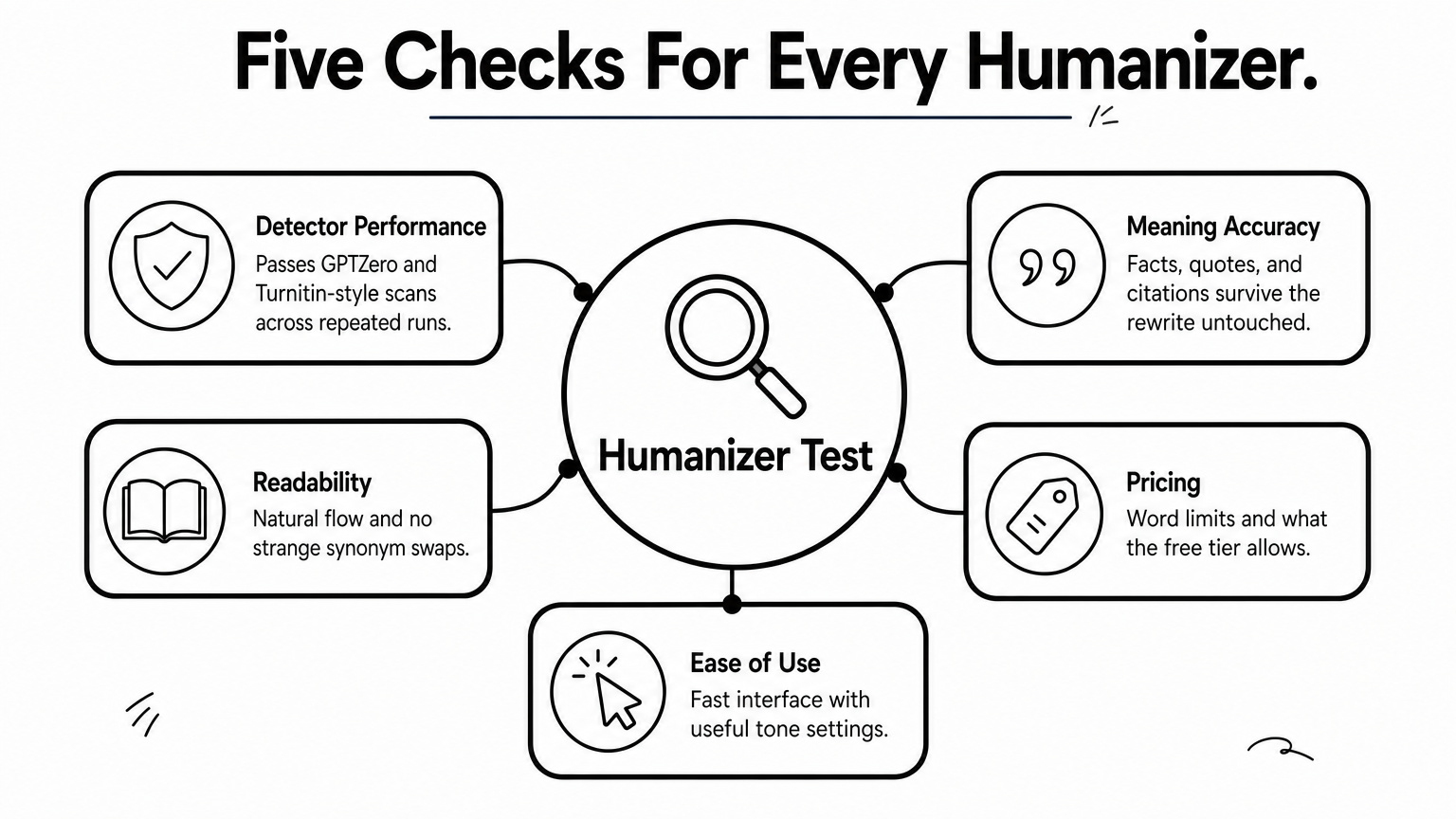
Detector results come first, but they are only one of five checks we run on each tool. Here is how we weigh them:
| Criterion | What we look for |
|---|---|
| Detector performance | Whether the output passes GPTZero, Turnitin-style checks, and similar scanners across repeated runs |
| Meaning and accuracy | Facts, quotes, and citations that survive the rewrite untouched |
| Readability | Natural flow, correct grammar, and no strange synonym swaps |
| Free plan and pricing | Word limits, monthly cost, and what the free tier really allows |
| Ease of use | Speed, interface, and useful extras like tone settings |
Why one detector score proves little
Scores swing from run to run. Detectors retrain often, and each one relies on different signals, so the same paragraph can pass today and fail next week. We treat any single pass as a snapshot, not a promise.
A humanizer that passes once has proven little; one that passes repeatedly and still reads well has earned its place.
Quality matters just as much as the score. Some tools beat detectors by stuffing in awkward synonyms, and a teacher or editor spots that kind of text right away. A clean score on garbled prose is a bad result. The best tool to humanize AI text keeps your meaning, your citations, and your voice intact.
What you should do on your end
Finally, plan to edit. Read every output before you use it, because even the strongest tool can bend a fact or flatten a point you care about. Also check your school’s or employer’s AI policy first. Some institutions allow AI assistance with disclosure, others ban it outright, and a humanizer will not change those rules.
1. GPTHuman
Best for
GPTHuman works best for students and bloggers who need a fast rewrite of one draft. It handles short to mid-length pieces better than long manuscripts.
- Essays and discussion posts
- Blog drafts
- Cover letters and emails
How it performs against detectors
GPTHuman markets itself on beating GPTZero and Turnitin-style scanners, and it includes a built-in detector check. Expect mixed results. It often lowers scores on a first pass, but stiff academic prose can still get flagged on a rerun.
So test the output yourself in the detector your reader will use. Then rewrite any flagged lines by hand.
A built-in score is a hint, not a verdict, so always recheck the result elsewhere.
Key features
- Multiple rewrite modes that change how aggressively the text is reshaped
- Built-in AI detection check to preview your score before you submit
- Simple paste-and-click interface that needs no setup
Free plan and pricing
GPTHuman offers a free tier with a small word allowance, which is enough to test one short sample. Paid plans are subscription-based, and annual billing is usually cheaper than month-to-month. Rates change, so confirm them on the site before you commit.
Limitations
The free allowance runs out fast, so you cannot judge long documents before paying. Aggressive modes can also bend meaning or swap in odd word choices. Check names, numbers, and citations line by line, because the tool will not protect them for you.
2. Humanize AI Pro
Best for
This tool suits writers who want a quick, low-effort rewrite without learning a complicated dashboard. It fits people who humanize AI text a few times a week, not those processing whole books.
- Blog posts and web copy
- Student essays and summaries
- Work emails and short reports
How it performs against detectors
The site claims it can slip past GPTZero, Turnitin, and similar scanners. Results depend heavily on your input. Casual, conversational drafts usually improve a lot, while dense academic prose often keeps a few flagged sentences after one pass.
Run the output through the detector your reader uses. Then rewrite any flagged lines by hand.
No humanizer replaces a final read by someone who knows the topic.
Key features
- Adjustable rewrite modes for lighter or heavier changes
- Grammar and flow cleanup built into the rewrite
- Paste-and-go interface with no account setup for a first test
Free plan and pricing
Expect a free trial with a small word limit, enough to test one sample. Paid plans run on a monthly or yearly subscription, and annual billing tends to cost less per month. Caps and prices change, so check the pricing page before you buy.
Limitations
Long documents may need splitting into chunks, which gets tedious. Output can also sound repetitive or oddly formal, and the tool may change figures or wording inside quotes. Verify every name, number, and citation against your original draft.
3. editGPT
Best for
editGPT suits writers who want to review every change instead of accepting one blind rewrite. It fits students and editors who care more about accuracy and control than speed.
- Academic essays and reports
- Drafts with citations or quotes
- Professional documents that need a light polish
How it performs against detectors
Results are decent, not magic. The tool shows edits in a track-changes style view, so you keep the changes that help and reject the ones that bend your meaning. Detector scores often drop after a pass, but very robotic drafts can still flag on GPTZero, so recheck the final version in the scanner your reader uses.
The safest humanizer is the one that shows you exactly what it changed.
Key features
- Highlighted edits with accept and reject controls, so nothing changes without your approval
- Separate modes for proofreading, paraphrasing, and humanizing
- Tone and style options for formal or casual writing
Free plan and pricing
A free tier with a small monthly word allowance lets you test one short sample. Paid plans are subscriptions with higher word caps, and annual billing usually costs less per month. Prices and limits change, so confirm them on the site before you upgrade.
Limitations
Reviewing edits takes longer than a one-click tool, so editGPT feels slow for long documents. Word caps on lower plans can also run out quickly. And a heavily AI-flavored draft may still need a manual rewrite of its stiffest paragraphs after the tool is done.
4. StealthWriter
Best for
StealthWriter suits people who want control over how hard the text gets rewritten. It fits anyone who tests several drafts and adjusts settings until the output reads right.
- Long-form blog posts
- Essays that need heavy rewording
- Marketing copy and web pages
How it performs against detectors
Settings are the main draw. Higher levels reshape sentence structure more aggressively, and that often lowers scores on GPTZero. Heavy rewriting has a cost, though, and top levels can leave clunky phrasing that a human reader notices.
Start on a lower level, then step up only if the detector still flags your draft. Recheck the result in the scanner your reader uses.
The strongest setting is not always the best one, because readable text beats a lower score on mangled prose.
Key features
Expect these core tools:
- Multiple stealth levels, from light edits to full rewrites
- Built-in detector scoring to preview your result
- Plain editor with a word counter
Free plan and pricing
A free tier with a limited word count per run lets you test the tool on a short sample. Paid plans are subscriptions, and higher limits and stronger modes usually sit behind them. Plans change, so check the pricing page before you buy.
Limitations
Limits on free use make full-essay testing hard. Aggressive levels can distort meaning or insert awkward synonyms, so verify every citation, number, and quote. Also remember that no setting guarantees a pass, since detectors keep changing.
5. Phrasly
Best for
Phrasly suits writers who want a humanizer and a detector in one place. If you rework drafts often and like checking results without switching tabs, it is one of the best apps to humanize AI text for that routine.
- Student essays and reports
- Blog posts and articles
- Freelance client drafts
How it performs against detectors
Phrasly targets GPTZero and Turnitin-style scanners, and its stronger modes noticeably lower scores on casual drafts. Formal academic prose is tougher, so expect a few flagged sentences after a first pass.
Lighter modes stay close to your original wording, while heavier ones reshape more. Start light and step up only if the detector still flags you.
Use the lightest mode that passes, because every extra rewrite puts your meaning at risk.
Key features
- Several rewrite modes, from light polish to heavy rewriting
- Built-in AI detector to preview your score before you submit
- Simple editor with higher word limits on paid plans
Free plan and pricing
Phrasly offers a free trial with a small word cap, enough to test one short sample. Paid plans are monthly or yearly subscriptions, and yearly billing usually costs less per month.
Rates and limits change. If a plan advertises unlimited words, read the fine print on per-run caps, then confirm everything on the pricing page.
Limitations
Aggressive modes can distort meaning or add stiff phrasing, so check every quote, number, and citation against your original. The free trial also ends too soon to test a full essay.
Remember that no mode guarantees a pass. Detectors keep changing, so recheck the final text and edit the weakest paragraphs yourself.
6. Undetectable AI
Best for
Undetectable AI suits writers who want control over tone and reading level. It is one of the best tools to humanize AI text for people who rewrite longer, more varied material.
- Essays and reports
- Blog and marketing content
- Cover letters and business documents
How it performs against detectors
Results are good on casual drafts and less steady on formal prose. The tool checks your text against several scanners at once, and that gives a useful first read. Strict academic writing on Turnitin-style checks is harder, so recheck the final text in the detector your reader uses.
A tool’s own detector grades its own homework, so confirm the result somewhere else.
Key features
- Purpose and readability settings, from high school to doctorate level
- Strength levels that trade quality for more aggressive rewriting
- Built-in multi-detector check and a separate paraphraser
Free plan and pricing
Expect a small free word allowance, enough for one short test. Paid plans are word-capped subscriptions, and yearly billing usually lowers the monthly rate. Limits and prices shift often, so check the pricing page first.
Limitations
Aggressive strength settings can swap in odd synonyms or change meaning, and quotes and figures are not protected. Word caps on cheaper plans also run out quickly on long essays. Read every line against your original, and rewrite the stiffest paragraphs yourself.
7. QuillBot humanizer
Best for
QuillBot suits students and professionals who already use its writing tools. It is one of the best apps to humanize AI text if you want one subscription for several jobs, such as paraphrasing and grammar checks.
- Essays and study notes
- Work emails and reports
- Light cleanup of AI-assisted drafts
How it performs against detectors
Results are steadier on light cleanup than on raw AI drafts. The tool smooths phrasing and varies sentence rhythm, which often lowers GPTZero scores. Formulaic ChatGPT output can still flag, and Turnitin-style checks are harder.
A tool that polishes your draft is not the same as one that hides it, so judge the final read.
Test a short sample first, then recheck it in the scanner your reader uses.
Key features
The humanizer sits inside a larger toolkit:
- Adjustable modes for lighter or heavier rewording
- Free AI detector to preview a score
- Paraphraser and grammar checker in the same account
Free plan and pricing
The humanizer has a free version with a word limit, enough to test one short passage. Premium is a monthly or yearly subscription that raises limits and unlocks more modes. Annual billing usually costs less per month, but confirm current rates on the site.
Limitations
QuillBot is a general rewriting tool, so it is less aggressive than detector-focused humanizers. Stiff academic drafts often need a manual pass afterward.
Free limits also run out quickly. Check quotes, numbers, and citations against your original, because the tool can still change wording you meant to keep.
8. WriteHuman
Best for
WriteHuman suits writers who want a clean, focused rewrite of short to mid-length drafts. It is one of the best AI humanizer picks if you value readable output over endless settings.
- Student essays and discussion posts
- Blog posts and newsletters
- Work emails and cover letters
How it performs against detectors
Results are good on casual and semi-formal drafts. The tool rewrites sentence rhythm and word choice, and that often lowers GPTZero scores. Dense academic writing on Turnitin-style checks is harder, so a few flagged lines can survive a first pass.
Test a short sample, then recheck the final text in the scanner your reader uses.
Pick the humanizer whose output you would still be happy to sign your name to.
Key features
- Built-in AI detector to preview a score before you submit
- Enhanced and standard models, so you can trade speed for polish
- Tone and readability options for formal or casual writing
Free plan and pricing
Expect a free trial with a small word cap, enough to test one short passage. Paid plans are tiered monthly or yearly subscriptions with higher per-run and monthly limits, and yearly billing usually costs less. Plans change, so confirm current rates on the pricing page.
Limitations
Word caps on lower tiers can run out quickly if you rewrite long essays. Stronger models may also change figures or wording inside quotes, so check every name, number, and citation against your original. And no setting guarantees a pass, so plan to edit the stiffest paragraphs by hand.
How to humanize AI text without losing quality
Even the best AI humanizer cannot finish the job alone. A short routine protects your meaning and keeps the text sounding like you.
A five-step routine
Follow these steps in order. Using the lightest mode first and checking against your original keeps most problems from ever appearing.
- Write a stronger first draft. Give the AI your own notes, examples, and a clear tone.
- Run the lightest rewrite mode before trying anything heavier.
- Compare the output with your original. Restore any changed quotes, numbers, and citations.
- Edit by hand. Mix short and long sentences, and cut filler.
- Recheck once in the detector your reader uses.
Edits that matter most
Detectors and readers both notice uniform rhythm and generic phrasing. Add one detail only you would know, such as a class example, a local number, or a short opinion. That does more than any setting.
Your own edits do more for quality than any rewrite mode.
Finally, read the text aloud. Anywhere you stumble, rewrite the line. Reading aloud catches odd synonyms and stiff transitions that a score never shows, and it takes about two minutes per page.
Choosing the right humanizer for you
The best AI humanizer is the one that fits your budget, your word count, and how much editing you are willing to do. If you want control, pick a tool that shows every change. If you want speed, pick a simple paste-and-click option. If you already pay for a writing suite, start with the tool you own.
Whatever you choose, treat the output as a draft. No humanizer guarantees a pass on Turnitin or GPTZero, so test a short sample, check every fact, and edit the stiffest lines yourself. Follow your school’s or employer’s AI policy too, because no tool changes those rules.
Want more practical guides and trend breakdowns like this one? Browse the latest articles on ilovetrend.com and check back often for fresh updates.
1 thought on “8 Best AI Humanizer Tools That Bypass Turnitin and GPTZero”