
You see a striking photo online and something feels off. The hands look strange, the lighting is too perfect, or the source is unclear. Now you need a quick answer, and you need it without paying for a subscription. A good AI image detector can give you one in seconds.
Here is the short version: free tools can catch many AI-generated images, but none is perfect. Most work the same way. You upload a photo or artwork, or paste a link, and the tool returns a likelihood score. Some also flag edits and deepfake-style manipulation. Treat the score as a strong hint, not a verdict.
In this list, we cover five free AI image checkers worth your time. For each one, you will see what it detects, how accurate it tends to be, and where the free version stops. We also note which tools work best for photos and which handle digital art better. Use two tools on anything important. When they agree, you can trust the result a lot more.
1. TruthScan AI image detector
How it works
TruthScan inspects the pixels, not the caption. You upload an image, and the tool looks for statistical patterns that AI generators leave behind, such as those from diffusion models. It then returns a likelihood score that tells you how probable it is that the image is synthetic.
- Open the image detector on the TruthScan site.
- Upload your photo or artwork.
- Read the score and the verdict.
Best for
Viral social media photos are where it fits best. If you want an AI photo detector for quick checks on news images, profile pictures, or product shots, it works as a fast first screen.
Artists and buyers can use it as an AI art checker too. Just remember that stylized illustrations are harder to judge than realistic photos, so the score deserves more doubt there.
Free plan and limits
You can test single images for free without a long setup. That covers most everyday checks, and it makes this an easy pick if you want an AI image detector free of cost.
Limits change over time, so check the current daily cap on the site before you plan a big batch. Bulk scanning and API access usually sit behind a paid plan.
Strengths and limitations
| Strengths | Limitations |
|---|---|
| Simple upload, no learning curve | Score is a probability, not proof |
| Clear result you can read in seconds | Screenshots and heavy compression weaken the signal |
| Beginner friendly | Brand-new generators can slip through |
Use TruthScan as your opener. Upload the original file, not a screenshot, because compression strips the clues the detector needs. If the score lands in the gray zone, run a second tool before you decide.
A detector score is a strong clue, never a final verdict.
2. ZeroGPT AI image detector
How it works
ZeroGPT built its name on text detection, then added an image checker to the same site. You upload a picture, and the tool returns a probability that AI made it. It works as a simple AI picture detector with a short path from upload to result.
- Open the image tool on ZeroGPT.
- Upload your file.
- Read the score.
Best for
Anyone already using ZeroGPT for text will find this handy. One site covers both text and images, which suits students, teachers, and bloggers who vet mixed content. For serious forensic work, a specialist tool is the better pick.
Free plan and limits
Free access covers basic single-image checks. Caps on file size or daily use can apply, so confirm the current limits on the site before you start. Higher volume usually sits behind a paid plan.
Strengths and limitations
| Strengths | Limitations |
|---|---|
| Familiar, easy interface | Image detection is newer than its text tools |
| Fast results | Little explanation of why an image was flagged |
| Free to try | Edited or compressed files can confuse it |
Treat it as a second opinion, not your only check. Its real value shows when you compare its score with TruthScan. If both agree, you can act on the result with more confidence.
Two detectors that agree tell you more than one detector that sounds sure.
3. Sightengine AI image detector
How it works
Sightengine started as a content moderation service, and its detector grew out of that work. You upload an image to the web demo, and the model returns a score from 0 to 1 that shows how likely the image is AI-generated.
It is trained on output from generators such as Midjourney, DALL-E, and Stable Diffusion, so it doubles as an AI artwork detector for digital art.
Best for
Developers come first. If you want to check images automatically, Sightengine offers an API, which most free detectors lack.
Moderators and small publishers also benefit, because they can scan many uploads without reviewing each one by hand.
Free plan and limits
The free tier gives you a limited monthly allowance of API operations, enough for testing and light use. Limits change, so verify the current quota on the pricing page.
Paid plans add higher volume and extra detection models, such as deepfake checks.
Strengths and limitations
| Strengths | Limitations |
|---|---|
| API built for automation | Setup is harder than a drag-and-drop tool |
| Numeric score is easy to compare | Free quota is capped |
| Covers art and photos | Short on explanations |
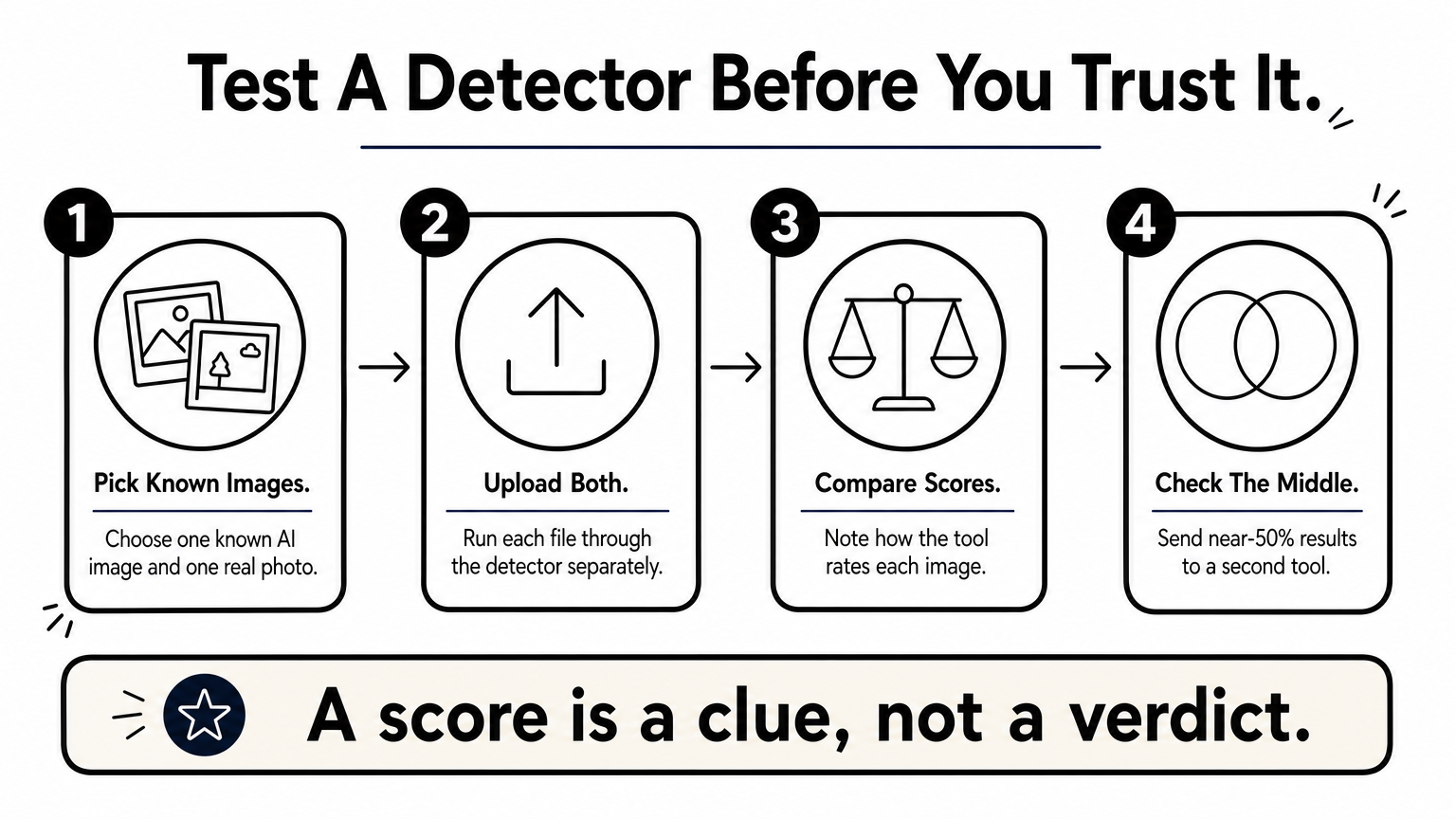
Run it on a known AI image and a real photo first, so you can see how it scores both. Pair it with TruthScan when the result lands near the middle.
A detector earns your trust only after you test it on images you already know.
4. Hive AI-generated content detector
How it works
Hive runs a content moderation platform, and its detector is open to the public through a web demo. You upload an image and get a confidence percentage plus a guess at which generator likely made it, such as Midjourney or DALL-E.
Beyond images, it also scans video, audio, and text. That makes it a flexible AI detector for images and other media in one place.
Best for
Journalists, fact-checkers, and researchers get the most from it. When you need to know which tool probably created a fake, the generator guess adds useful context.
A browser extension is also available, which makes Hive handy as an AI photo checker while you scroll social feeds. Check the Chrome Web Store for the current version.
Free plan and limits
The web demo is free for individual checks, and that covers most casual use. Hive’s API targets businesses, so confirm current pricing and credits on the site before you build anything on it.
Strengths and limitations
| Strengths | Limitations |
|---|---|
| Names the likely generator | Business focus, less beginner polish |
| Handles images, video, and audio | Fully automated use needs a paid plan |
| Browser extension for quick checks | Heavily edited files can lower accuracy |
Run your most important images through Hive as a cross-check against TruthScan. If Hive names a generator and the other tool also flags the image, treat it as likely AI.
Knowing which generator likely made an image is worth more than a bare percentage.
5. WasItAI image detector
How it works

WasItAI is a lean image AI detector built around one job. You upload a file or paste an image link, and the tool returns a verdict on whether the picture looks AI-generated, with a confidence level.
- Open the WasItAI site.
- Drop in your image or paste its URL.
- Read the verdict and confidence level.
Best for
Casual users who want speed will like it. If you need an AI pic detector with minimal setup, this is the quickest route on the list. It suits fast checks of memes, profile photos, and art you spot while scrolling.
Free plan and limits
Basic checks are free for single images, which covers everyday use. Policies shift, so confirm any usage caps on the site before you rely on it. Do not expect batch scanning or an API like Sightengine offers.
Strengths and limitations
| Strengths | Limitations |
|---|---|
| Very simple, works from a link | Few details on why an image was flagged |
| Quick verdict | No bulk or automation features |
| Free for single checks | Edited or compressed files can mislead it |
Use WasItAI as your tie-breaker. When TruthScan and ZeroGPT disagree, a third opinion settles most doubts, especially on a stylized AI art detector case where scores swing.
When two detectors split, a third vote beats guessing.
Choosing the right detector for you
The best AI image detector is the one that fits how you work. Start with TruthScan for quick photo checks, pick Sightengine if you need an API, and turn to Hive when knowing the likely generator matters. ZeroGPT and WasItAI make solid second and third opinions.
Whatever you choose, one rule runs through this whole list. No free AI image checker is perfect, so run important images through two tools and always upload the original file, not a screenshot. A score is a clue. Your own judgment about the source still counts.
Detection will keep changing as generative AI improves, and free limits shift with it, so confirm the current caps before you rely on any tool. For more practical guides on what is trending and how to make smarter choices online, explore the latest articles on ilovetrend.com.
1 thought on “5 Best Free AI Image Detectors to Check Photos and Art”